
Court Calendar for Sanford courts lets anyone check today’s court schedule in minutes. By entering a case number, party name, or judge’s name on the clerk’s online portal, you can see the hearing calendar, courtroom location, and hearing time for each docket. The system shows daily court dates, upcoming court hearings, and any status codes such as rescheduled or cancelled. If a date does not appear, try a court date lookup by date or search by case number to confirm whether the entry is pending. The portal also filters results by hearing type, like arraignment, pretrial, or sentencing, so you know exactly what to expect.
Court Calendar in Sanford also supports detailed lookups when you need specific information beyond today’s list. To find a court hearing by name, type the party’s last name into the search field; the system returns the hearing date, courtroom number, and presiding judge. If you need the court schedule by judge, choose the judge’s name from the dropdown and the portal displays all upcoming hearings they will handle, including civil, criminal, and family matters. Users often wonder why a court date is missing from the calendar; the answer is usually that the entry is still being entered or the case is sealed, so a court date lookup by case number is the safest way to verify.
How to Search Court Calendar
The Court Calendar for Sanford court matters is the Seminole County Clerk’s public schedule service for locating listed hearing dates and related case details. A court calendar search helps a party, attorney, or member of the public match a case number, party name, or judge with a hearing date, time, courtroom, division, and status. Its main purpose is schedule lookup and case lookup, not case research or legal advice. Entries can change, so check the live result and any notice served in the case before relying on a date.
Official Search Portal: https://www.seminoleclerk.org
Steps to Search
- Open the official site and locate the court calendar or court schedule search area.
- Enter the case number to narrow the search to one matter. If you do not have it, use the party’s last name or select the judge’s name in a judge schedule search.
- Set the date range and court division, then narrow the result by hearing type when those filters are shown.
- Open the matching entry and compare the case number, hearing date, time, courtroom, presiding judge, hearing type, and status.
- If the date is missing, changed, or unclear, call the clerk before relying on the schedule.
Court Schedule Information
A court schedule is a time-and-place record for matters set before a judge. Each listing can connect a case with its planned hearing details, which helps people confirm where and when to appear. A listing does not replace the full case file, a served notice, or advice from a lawyer who handles the case.
| Schedule Field | What It Identifies | What to Check |
|---|---|---|
| Case number | The case connected to the hearing | Compare every digit with the number on your case papers or notice |
| Listed party name | A person or party connected to the case | Use the displayed name to confirm that the result matches the correct matter |
| Hearing date | The calendar date assigned to the event | Check the live status before making plans |
| Hearing time | The planned start time | Read it with the date, courtroom, and status |
| Courtroom | The listed room or hearing location | Look for a new room after a location change |
| Presiding judge | The judge shown for the event | Compare the name with the case details |
| Hearing type | The type of court event listed | Examples include arraignment, pretrial hearing, motion hearing, trial, and sentencing |
| Court division | The civil, criminal, or family grouping used by the schedule | Choose the division connected to the case |
| Calendar status | The current condition of the listing | Check for rescheduled, canceled, postponed, continued, or changed wording |
Daily, Upcoming, and Judge Calendar Views
A daily calendar answers a narrow question: what is listed on today’s court schedule for that court. An upcoming view covers later dates and lets you review several scheduled matters at once. A judge calendar groups current entries assigned to one judge. A case-number or party-name lookup works better when you are confirming one case.
Use the view that matches what you know. Start with the case number when you have it. Use the date or judge view when you know that detail, then confirm the returned matter by its case number and party name. These views show the same schedule in different ways, so a changed event may appear differently when the date range or status filters change.
Hearing Time and Courtroom Location
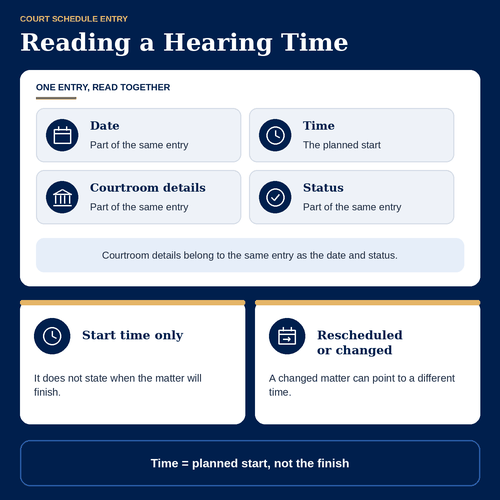
A hearing time is the planned start shown for the matter. It does not state when the matter will finish. Courtroom details belong to the same entry as the date and status, so read them together. A rescheduled or changed matter can point to a different time or room, and an older screenshot may still show the former details.
The calendar does not state public seating, entry procedures, or parking arrangements for a particular date. Follow any case-specific instructions, courthouse signs, or directions from the clerk’s office. Reopen the live entry before leaving for court, especially when the hearing is scheduled for the same day.
Case Number and Listed Parties
A case-number lookup gives the clearest way to confirm one exact matter because shared names can point to more than one case. A party name search is useful when the case number is unavailable, and entering the last name can narrow the results. Compare the displayed party name, case number, and date with the papers or notice you hold.
If a name search returns many results, use the case number to select the correct one. The name shown on the calendar is an identifying label rather than a full report about that person. For a party involved in a case, the case papers and served notice remain the best sources for case-specific instructions.
Hearing Type and Presiding Judge
The hearing type names the court event shown on the docket, such as an arraignment, pretrial hearing, motion hearing, trial, or sentencing. It gives a quick label but may not describe every issue set for that date. The presiding judge field helps confirm which judge is listed for the event.
A court schedule by judge groups the current entries assigned to that judge. It can help a party or attorney compare scheduled matters, yet each result still needs its own case-number and status check. A judge listed for one matter does not mean that judge will hear every matter shown for the same date.
Calendar Status Codes
Calendar status explains whether the listed event remains active and whether its details have changed. The schedule can use full words or abbreviated notation. Labels seen in court schedule searches include rescheduled, canceled, postponed, continued, and changed. Rescheduled means the matter has moved to a different date or time. Canceled means the listed event will not occur in that slot. Postponed or continued means the event has been delayed, with a later date or time possibly entered elsewhere. Changed is broader and calls for comparing the date, time, courtroom, and remote-access field. Read any on-screen explanation for an unfamiliar code. Do not treat an old status as current after the live entry updates. A new hearing date may carry a different case number only when the court has treated it as a separate matter, so confirm the case details before assuming that two entries refer to the same event.
Types of Court Hearings
A case category and a hearing type answer different questions. The court division groups cases by subject, case search,while the hearing type identifies the event set for the listed appearance. Knowing both prevents a civil motion from being confused with a criminal hearing or a family case.
Civil, Criminal, and Family Dockets
Use the division field to narrow a broad search before reading the hearing type. The schedule groups Sanford matters into civil, criminal, and family views, and each division can use different hearing labels.
| Court Division | General Meaning | Details to Confirm |
|---|---|---|
| Civil | Noncriminal disputes between parties | Check the motion or trial label, case number, date, and courtroom |
| Criminal | Matters involving criminal charges and prosecution | Check the hearing type, current status, judge, and listed location |
| Family | Family-law matters handled within the family division | Check the case number, hearing type, courtroom, and any status change |
If your case is not labeled civil, criminal, or family, confirm its division with the clerk rather than forcing it into one of those filters. A hearing type found in another division may have different entry rules or status wording.
Arraignments and Pretrial Hearings
An arraignment is a hearing tied to formal charges and the defendant’s response. A pretrial hearing occurs before trial and can address case status, disputes, and trial preparation. The public calendar can show the event, date, time, and judge, but it may not show the full agenda or every issue.
For a party or attorney, the scheduled label does not replace the written notice. Check whether the entry carries a change status and whether the assigned courtroom matches the location on the notice. If those sources conflict, contact the clerk about the calendar entry.
Motions, Trials, and Sentencings
A motion hearing is set when a court is asked to rule on a request. A trial hearing is set for deciding the case after required pretrial steps. A sentencing hearing is set for sentence proceedings after the case reaches that stage. Not every case has each event, and one case can have several hearings over time.
The hearing label gives the event category rather than the evidence, claims, or likely result. Check the case number, date, time, courtroom, and status each time. A change in one field can affect the rest of the plan even when the hearing type stays the same.
Schedule Changes and Remote Information
Calendar entries can change after they are posted. The most reliable check is the live entry at the time you need it, read with any notice received in the case. Status wording tells you what kind of change to look for, but it may not explain the reason for the change.
Rescheduled and Continued Hearings
Rescheduled and continued are separate schedule outcomes. A rescheduled hearing has moved to a new listed date or time. A continued hearing has been delayed, and the court may place it on another date or time later. A postponed entry is also delayed. When the wording says changed, compare the date, time, courtroom, and remote-access field.
Use the newest matching entry rather than a copied notice or screenshot. If only the old entry appears, or if the replacement lacks a new date, call the clerk with the case number and the notice date. That check can confirm whether the matter was continued, moved, or removed from the public listing.
In-Person Attendance Rules
An in-person court calendar identifies the listed location, but it does not decide whether the public may attend. A judge can close a hearing, restrict the matter, or change the room. Access rules can also depend on the type of case and the order issued for that hearing.
Follow the notice for a party, any posted courthouse sign, and instructions from the clerk. Do not treat a visible calendar listing as permission to enter a closed courtroom. If the entry does not name a public entrance or give attendance instructions, ask the clerk before traveling.
Virtual Hearing Links
When the official entry includes a virtual hearing link, it supplies the access route assigned to that listing. The link does not by itself mean the hearing is open to the public. Access can depend on the case, the type of hearing, and the court order, so a case participant and a member of the public may have different options.
Use these checks before the hearing:
- Open the link from the current official calendar entry rather than an older copy or a message that lacks case details.
- Confirm the case number and party name on the calendar page before joining.
- Test the microphone, network connection, and any other required device before the listed start time.
- Keep the case notice and clerk’s phone number nearby in case the connection fails or the entry lacks access details.
- Recheck the status shortly before the hearing because a remote hearing can move to in-person attendance or another remote format.
Schedule Accuracy and Resolution
A schedule search can return no result even when a case has business before the court. The entry may still be waiting to be posted, criminal history,may fall outside the selected dates, or may be subject to public-access limits. Treating a blank result as proof that no hearing exists can lead to a missed appearance, so use a consistent check when a date matters.
Calendar Update Delays
A newly ordered hearing may reach the public calendar after the case action occurs. Updates to time, courtroom, or status can also appear after an earlier version. If the portal shows an update marker, use it to judge how recent that view is. Without such a marker, reopen the live entry and compare it with the most recent notice.
A page opened on a phone can remain on screen after the online schedule changes. Refresh before treating it as current. For a hearing set for the same day, calling the clerk can prevent confusion when a live entry and a printed notice disagree.
Confidential and Sealed Hearings
Some matters do not appear in a public court schedule because they are confidential, sealed, or subject to another access rule. The absence of a listing does not prove that no hearing exists. Public search tools cannot reveal details that the court has chosen not to publish.
A party or attorney should check notices and case records available to them. A member of the public can ask the clerk whether a public calendar entry exists. The clerk can confirm the published schedule record, while the lawyer or party can address case-specific legal effects.
Missing Schedule Resolution
If a court date lookup by case number returns nothing, confirm the number and remove narrow filters that could hide the entry. Check a wider date span, then try the party’s last name and the listed judge if needed. This separates a search problem from a calendar posting delay. If the date was expected after a recent order, ask the clerk whether the entry is pending, restricted, continued, or listed under a different date. Keep the case number, party name, judge, and hearing date from the notice ready for that call. Do not rely on an unverified date from another person’s message. Once a current entry appears, record its date, time, courtroom, hearing type, and status. Check it again before the hearing and after any notice about a change. The clerk is the source for a published calendar entry, while a served notice supplies the instructions received in the case.
Contact Details
Use the official portal for a routine court calendar search. Use the clerk’s phone number when a result is missing, a status conflicts with a notice, or a hearing location needs confirmation. Have the case number and party name ready when you call, along with the judge, hearing type, and date printed in your notice.
Questions the Clerk Can Answer
Ask about a published entry, current date and time, listed courtroom, judge, hearing type, status, or access to a remote hearing. If an entry is absent, give the case number and expected date. The clerk may not disclose sealed details, but can explain whether a public listing is available when that falls within the clerk’s role.
- Clerk’s office: Seminole County Clerk, 101 Bush Blvd, Sanford, FL 32773
- Phone: (407) 665-4300
- Office hours: Monday through Friday, 8:00 AM to 4:30 PM
For in-person assistance, contact the office during its posted hours before visiting. If you cannot reach the clerk, continue checking the live calendar and keep your case notice available.
Frequently Asked Questions
The Seminole County Court Calendar lets anyone find upcoming court dates, hearing locations, and judge assignments. By using the online portal, you can match a case number, party name, or judge with the exact time and courtroom. The system updates daily, so it reflects the most current schedule. Knowing how to search the calendar saves time and avoids missed appearances. Below are the most common questions people ask about court calendar searches.
How can I search the Seminole County Court Calendar by case number?
First, open the Seminole Clerk’s portal at https://www.seminoleclerk.org. Next, select “Court Calendar Search.” Then, enter the full case number in the designated field. After you click “Search,” the site lists the hearing date, time, courtroom, and judge. If the entry shows “Pending,” check back later as the docket may still be loading. Finally, write down the details or print the page for reference.
Where can I find today’s court hearing schedule for Sanford, FL?
Visit the same portal and click the “Today’s Schedule” link on the homepage. The page shows every hearing happening that day, grouped by court division. Each line includes the case name, hearing type, judge, and courtroom number. Use the scroll bar to view all entries. If you need a printed copy, select “Print Schedule” at the top of the list. This view updates every few minutes, so you always see the latest information.
What steps are needed to locate a court hearing by judge name?
Open the court calendar portal and choose “Search by Judge.” Enter the judge’s full name or last name in the search box. Then, select the date range you want to review. The results display all hearings assigned to that judge, along with case numbers and locations. You can sort the list by date or by courtroom. If the judge has multiple assignments, the portal highlights each division separately.
How do I check if a court hearing has been rescheduled or canceled?
Start by logging into the calendar portal and locating the original hearing entry. Look for a status label such as “Rescheduled” or “Canceled” next to the date. If the status is missing, click the case number to view the detailed docket. The docket page lists any recent changes and provides a new date if the hearing moved. Finally, note the updated information and contact the clerk’s office at (407) 665-4300 if you need confirmation.
Can I attend a virtual court hearing using the court calendar portal?
Yes. When you locate the hearing in the calendar, check the “Location” column. If the entry shows “Virtual” or provides a link, click the link to open the video platform. The page includes the meeting ID, password, and start time. Before the hearing begins, test your audio and video settings. If the link is missing, call the clerk’s office for the virtual access details. Remember to join a few minutes early to avoid missing the start.